
Local FFmpeg extraction
Frame extraction runs on your Mac with the bundled FFmpeg pipeline. Source videos stay on disk for extraction; the app does not send video or frame pixels to a conversion server.
Desktop app
A dedicated desktop studio for finding frames worth keeping. Pick your platform below — Mac Apple Silicon is available now.
Choose your platform
GetVideoFrames Studio
Desktop Smart Frame Studio
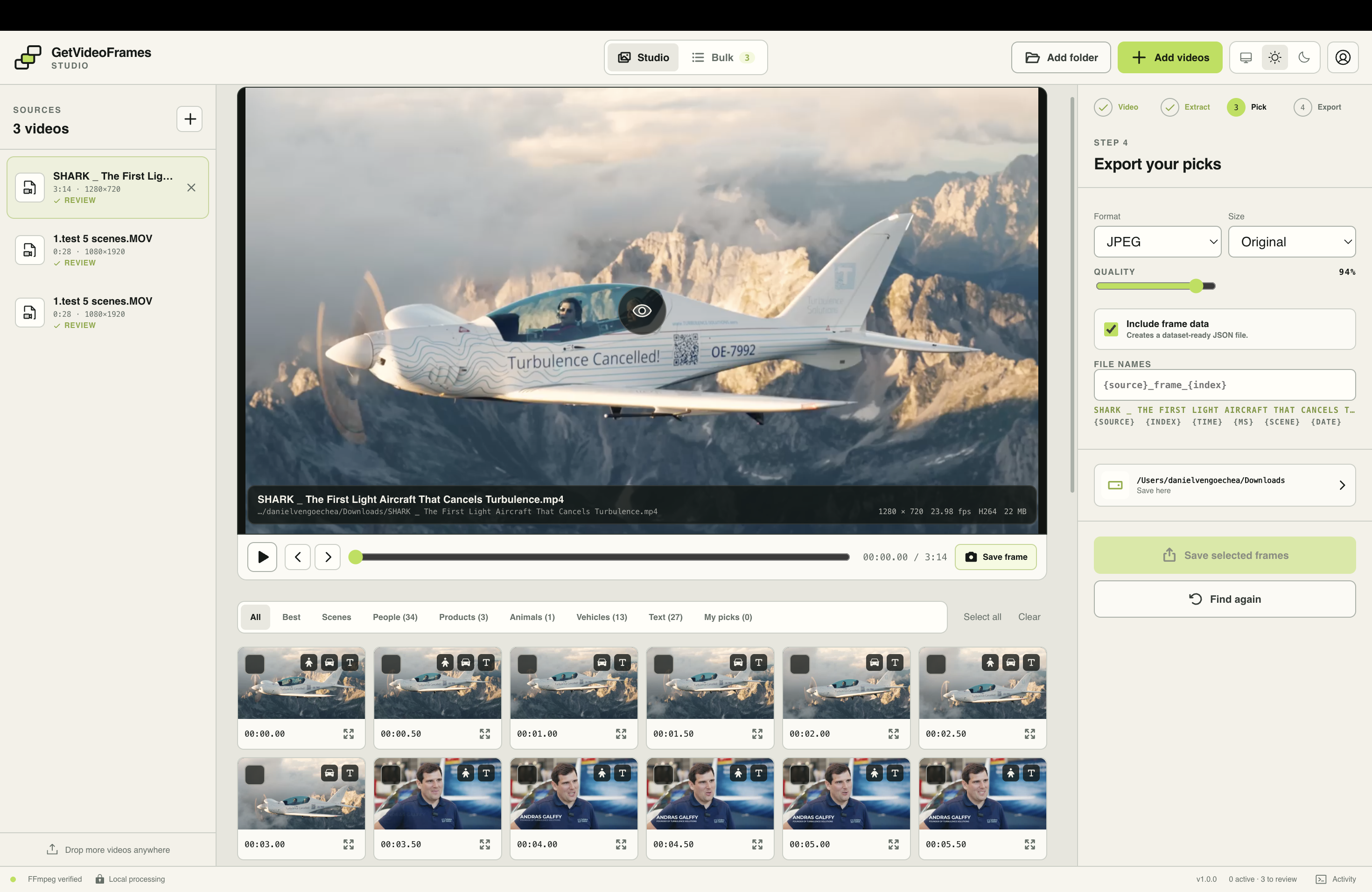
GetVideoFrames Desktop is a local video frame extractor and review studio for macOS Apple Silicon. Import one or many videos, extract review candidates with FFmpeg on your machine, pick keepers with Smart Collections, then export full-quality stills as JPG, PNG, or WebP — without uploading source footage for extraction.
How it works
Drop local files into Studio or Bulk. GetVideoFrames probes duration, resolution, fps, and codec on your device and keeps each source in a persistent queue you can pause, resume, cancel, or retry.
Choose sampling every N seconds, a fixed frame count, or all frames, then set an optional start/end range. Extraction runs locally and lands in review as soon as frames are written — you do not wait for analysis to finish before browsing.
Browse Best, Scenes, People, Products, Animals, Vehicles, All, and My picks. Scene carousels let you toggle Key, Best, or All per scene while on-device detection fills object filters when models are available.
Set format, size, quality, destination, and a filename template, then save. Selected timestamps are re-extracted from the source at final quality, with optional manifest.json metadata for datasets and handoff.
Desktop capabilities
Frame extraction runs on your Mac with the bundled FFmpeg pipeline. Source videos stay on disk for extraction; the app does not send video or frame pixels to a conversion server.
Studio keeps one video dominant: preview, scrubber, start/end range markers, live extract progress, and a right-rail journey of Video → Extract → Pick → Export so the next action stays obvious.
Extract every N seconds, distribute a fixed count across a range, or pull all frames when you need dense coverage. Start and End markers clamp safely so the range never ends before it begins.
Review is collection-first, not a flat dump of thumbnails. Best aggregates highlights; Scenes use horizontal carousels; People, Products, Animals, and Vehicles group detection results; All and My picks stay available for manual control.
After extract, local YOLOX-Nano inference can label people, products, animals, and vehicles on your machine. If models are missing, jobs still finish and those filters stay visible with a clear unavailable state instead of disappearing.
Scene cuts adapt to each clip’s frame-difference profile instead of a single fixed threshold, so quiet talking-head footage and fast edits both produce usable scene groups for Key / Best / All picks.
Bulk applies one sampling setup across selected ready videos, then supports pick strategies such as Best, Best per scene, scene anchors, People, Products, Animals, Vehicles, or All candidates before sequential export into one subfolder per source.
Store extraction settings, pick strategy, and export options as named presets. Load them to restore controls immediately and apply compatible options to selected configurable jobs.
Review thumbnails are analysis assets. Saving re-extracts selected timestamps from the original file at your chosen JPG, PNG, or WebP settings, optional max width, quality, and destination folder.
Name exports with tokens such as {source}, {index}, {time}, {ms}, {scene}, and {date}. Turn on Include frame data to write manifest.json alongside images for ML folders, editors, or client handoff.
Save Frame captures a full-quality still at the current playhead. Expand any candidate into a zoomable lightbox that loads a full-quality preview without using the low-res review thumb as a stand-in.
Pause, resume, cancel, retry, and clear finished work without losing export history in Bulk. Free trial can save up to five frames; Pro Lifetime activates the app on up to three devices with your account email.
Smart Collections
Smart Collections turn extracted candidates into reviewable groups under the video. Filters stay on one horizontal row, show live counts when analysis finishes, and never clear manual picks when you switch videos or wait for detection.
Best is the highlight hub: keepers drawn from scenes, quality ranking, people, products, animals, and vehicles so you can scan the strongest frames first.
Each scene is a horizontal carousel with a Key / Best / All toggle. Key defaults to Start, Middle, and End anchors; Best ranks quality inside that scene; All shows every candidate in the cut.
Object filters group temporal moments or concrete classes such as Laptop, Dog, or Car when on-device detection finds them. Empty results show count 0; unavailable detection shows an extract-again hint instead of hiding the chip.
All lists candidates chronologically. My picks holds your selection across collection switches, Bulk strategies, background analysis completion, and app restarts via each job’s saved results.
Bulk mode
Bulk is the power-user surface over the same persistent queue. Filter by All, Ready, Processing, Review, Done, or Issues; multi-select sources; extract with one shared sampling config; apply a pick strategy per job; then export sequentially with shared format, size, quality, template, manifest, and destination settings.
Local processing
Desktop extraction, scene analysis, and object detection are designed to run locally. Your source video is not uploaded for frame extraction. Optional product analytics can still send privacy-safe events such as page or feature outcomes; they do not include video pixels, filenames as free text, or export contents. Practical limits still depend on codec support, disk space, RAM, and clip length.
Who it is for
Pull thumbnail and chapter candidates from long exports, review scene anchors quickly, and save only the keepers at full quality without re-rendering timelines.
Import a batch of clips, mark ranges, browse scene carousels, and export consistently named stills for decks, client reviews, and cut lists.
Sample densely or by interval, keep manifest.json with frame data, and organize exports by source folder when you are preparing labeled or unlabeled still sets from footage you are allowed to use.
Work with client, research, or internal footage that should not travel through an upload converter. Detection and export stay on the workstation that already holds the files.
FAQ
Before you install
Pro Lifetime unlocks desktop activation after purchase. The free browser extractor stays available without installing anything.
Explore
Smart Frame Studio for iPhone and iPad with on-device Smart Collections.
Free browser extraction and Pro Lifetime for Desktop Studio.
Extract stills in the browser with no install when a file is browser-decodable.
Compare browser, CLI, desktop, and upload workflows honestly.
Sampling-focused browser workflow for dataset-style stills.
Command-line frame extraction patterns and limits.
Planned managed products plus the open-source GVF CLI/MCP.